Let me set the scene: It’s 2001, pre-9/11, high school.
Having finally accepted the Dreamcast’s fate and being a major anti-PS2, Dreamcast fanboy (cut me some slack, I was 18 and lived in my parents’ basement), I became enamoured with Microsoft’s first foray into console gaming: The Xbox. I bought one on day one, fervently posted on all of the major forums, racked up hundreds of hours in local multiplayer Halo…
Then, to my happy surprise, I was to be part of the Xbox Live beta test. I was a bit of an online PC gamer at the time (Tribes 2 ftw) and had played quite a few hours of online console games on the Dreamcast.
Fast forward 12 years, and here we are.
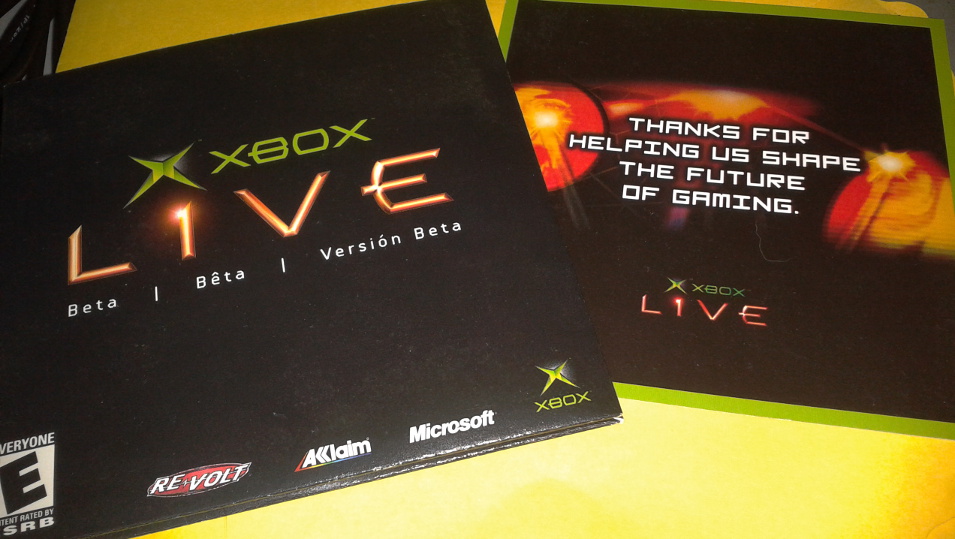
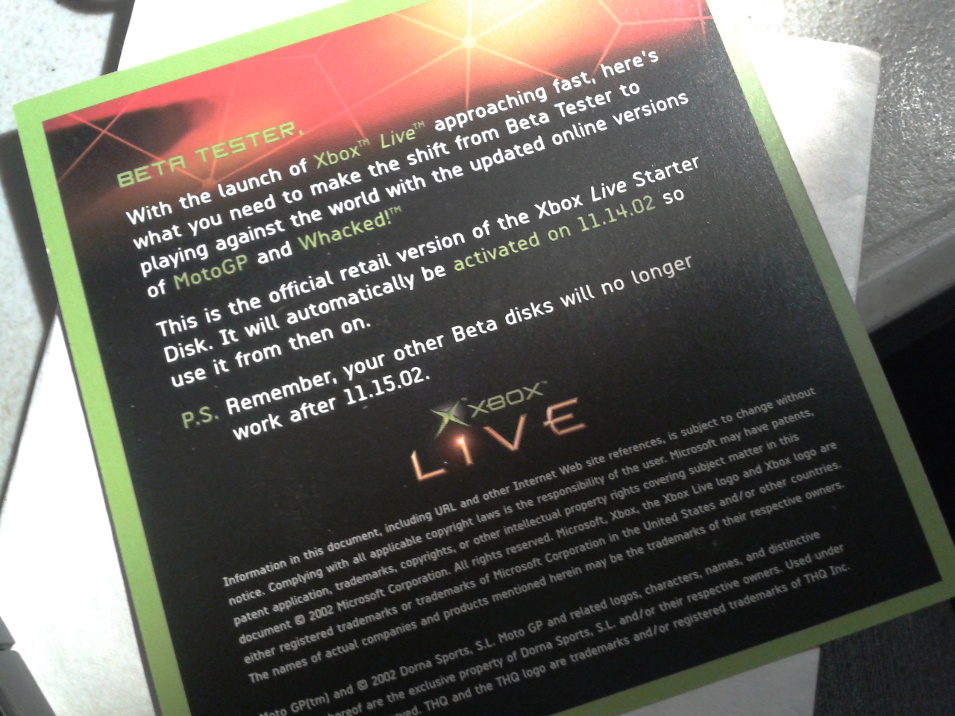
I have been re-organizing my office since a number of people have given me boxes of their old videogame collections. In one of my chests, I found my Xbox Live beta tester box, which I received from Microsoft in September of 2002. Here are some snaps!
Original box – names removed to protect the innocent :)This is before consoles tracked how many hours you’ve played each game, but I bet “hundreds” for MotoGP and Re-Volt, each.Welcome to the future of gaming!Set your clocks: 11.15.02.
By 2004 I had moved almost exclusively to the PC. I bought an Xbox 360 but sold it to a friend shortly thereafter, unimpressed. I was also very disappointed that they gave away my Xbox Live GamerTag, which was supposed to be ours for life.
I recently got some harsh and direct feedback from a person that I trust.
It was hard to listen to, but I needed to hear it.
For the past two years, I have lived alone. I’m responsible for me in almost every respect. In those two years, my skin has grown thicker, my balls bigger, and my confidence stronger. Because of this, it feels like going against the grain in society has become normal.
Many times over the course of a day someone whom I don’t know will point and laugh at me on my ebike or will criticize my decisions as former group lead of GDG Waterloo. Sometimes it’s hard to live with, but in a way I’ve just gotten used to shrugging it off and doing it my way because, well, everyone’s a critic.
We live in a very judgemental society. Everyone is looking with disdain at someone else who may be different in some respect. Because of this noise, it’s too easy to miss or dismiss signal.
As much as I wanted to say that the reason I failed was because of someone else or something else, that’s just not the case. He called me on it and made me face it, and I’m stronger for it. You can bet that I’ll be doing my best to make sure it doesn’t happen again.
I’ve read this and re-read it trying to think about exactly what it is I’m trying to say. I think it is: We can’t see ourselves as others see us, no matter how hard we try or how much we think we can. When someone criticizes you and they’re right, admit it. To them and to you. Face the truth, no matter how hard it is, and do the right things to fix it.
Last month, I bought an e-bike. It’s an Emmo Alien. I got it used on Kijiji for $600. Where I live, it doesn’t require insurance or a license to ride. It costs me nothing to charge since my rent includes utilities.
Emmo Alien E-bike. Mine’s black, though.
Like pretty much everyone in Canada, I’ve had at least one bike at any point in my life. I never once considered riding it to work. My mental picture of a person that biked to work was a sun-glassed, angry man in really tight spandex. I couldn’t imagine biking all the way to work, sweating the whole way there, angry at other drivers for cutting them off or not knowing the rules. It’s just not for me. It felt like riding a bike to work meant you had to join some sort of environmental cult.
The truth is, while I care very much about the environment, I’m a cheapskate. And I’m lazy. Riding an e-bike is free. And I don’t just mean free as in beer. It feels free, as in freedom. I haven’t used my car in so long, a tire went flat from sitting. The insurance on my car (never mind gas or repairs) per year pays for more than two e-bikes per year. I could actually buy a second one, put it into a dumpster, light it on fire, and I would still be ahead.
And, do you know what? Riding an e-bike is fun! It’s liberating. My girlfriend finds it empowering. She’s never gotten the hang of riding a regular bike, but she’s learned how to ride the e-bike. We do groceries (it has hooks to put the bags as well as two storage compartments), we go for picnics, we go out and get fresh air, we get some sun.
Sure, a cyclist looks ridiculous, but when a driver in a big pickup truck zooms past in a testosterone-filled money-burning pissing contest, who looks more ridiculous?
I’m a bit late in posting this, but June is Bike Month in Waterloo Region. The thing is, it doesn’t have to be just June or just Waterloo Region. Have you ever tried biking to work? Do it tomorrow and let me know what you think.
If you’re interested in some data, it takes about 7 hours to charge from completely empty to completely full. A full charge lasts me about 2 and a half hours of continuous use, or about 50-70km, depending on whether or not it’s just me or with a passenger. My trip to work (including to McDonalds for breakfast) is 7.5km, each way. I do this trip Monday to Friday, rain or shine.
The single largest trip I’ve made on the ebike so far. With a passenger. Had half charge left when I got home.
The one reason I don’t is because of the bullshit link-up between it and YouTube, where they try to change your channel name to match your Google+ profile. I love my YouTube and don’t want things fucking with it, thanks.
The stuff I actually want starts below 50% down the page.
I understand ads are the main source of revenue for most Internet services. I’m not trying to say ads on a website are bad. It’s just… damn, that’s a lot of ads.
Seriously? Like, nobody at Dropbox stopped for a second and thought: “hmm, are we sure we’re sending the right message, what with the still-in-the-news revelations of the illegal USA surveillance and all?”
People who know me know I love Dropbox. I blogged about it here back in 2009. I’ve been a paying member for years. I’ve got two accounts. Well, had. I’ve cancelled them both and switched to BitTorrent Sync since this news broke.
Road to VR has a great article on GameFace’s new VR kit, which has a resolution of 1440p. That’s not the real news, though. The real news is this:
“It’s freeing and intuitive to have a mobile VR headset where you can let the rotation of your body determine the direction of your virtual self. The same can’t be done with tethered VR headsets like the Oculus Rift—where you generally always face the same direction, but use some form of unnatural input to rotate your virtual self—simply because you’d get tangled up in the cord.”
Here’s a blog post you wouldn’t normally expect to see on this blog. In the past, I’ve not usually been big on the Microsoft stuff. That is quickly turning around. Take a look at all the amazing stuff they did in the last day:
I’ve had my Oculus Rift Developer Kit Version 1 (DK1) for just under a year, after receiving my kit on April 11, 2013. In that year, I’ve built a few apps and played with a ton of other people’s apps from Oculus Share. My experience with the DK1 is that, while it’s good, it’s not great. It’s funny, because, while the low resolution and heavy screen-door effect were the two initial problems I had with the unit, over time, they took a back seat to another, more basic problem:
The Oculus Rift DK1 wire is fucking annoying. Not just annoying, but a lot of the time it ruins the experience of immersing yourself in the virtual environment. The new term that people are using for this is “presence.” When I’m wearing it, I can’t turn around fully without feeling the wire tickle my neck or hear the breakout box slide across my desk, which makes me worry that it’ll fall off and I’ll break it, so I take the headset off to make sure it’s safe. The wire undoes exactly what the rest of the kit is trying so hard (and succeeding, mostly) to do: immerse me in the experience. All the time that I use the unit, I fear of fully moving in any direction because the wire is there.
That wire has got to go.
I know that Oculus is working its hardest to reduce the latency between the time that you move and the time it shows the movement on the screen in the headset. I know that going wireless will increase that latency. But, hot damn, at this point, I’m almost willing to take a slightly more delayed response if I can do without the wire.
My first reaction, similar to that of most other developers who are working with the Oculus Rift, upon hearing of the Facebook acquisition of Oculus, was one of intense disappointment. It felt like our favourite band just sold out to a huge record label. Oculus was the embodiment of the VR industry itself: the scrappy little guy, fighting against all odds to prove to the world that he can do it.
All that changed this past week when it was announced that Facebook acquired Oculus.
Enough has been typed and said over the past week, with emotions ranging from “take our ball and go home” to “this is the best thing that could have happened to us.” After letting it settle, thinking about it, seeing John Carmack give his support, then Michael Abrash leaving Valve to join the team, my feelings on it have completely changed. This change at Oculus is a big deal, in a good way. Oculus now has the best chance of making true VR a reality. They have the best team in the world and the biggest budget behind them to do it. Colour me excited.
Counter Strike Global Offensive (CS:GO), a game I have been playing often since summer of last year (2013), is currently facing a dilemma that all online multiplayer games (and many social networks) face: as it grows in popularity, which is required to grow the monetary kick-back for developing and running the service as well as pushing the service’s features forward, the average level of player maturity decreases in proportion, to the point where older players who are used to playing with a more mature player-base will flee the game for some other outlet until this process takes over that one, and so on. It’s important to note that I’m not speaking about the skill of CS:GO players, since that is handled quite well by their Elo ranking system, but instead the maturity level, which means things like the level of racist voice and text chat, lack of statesmanship, etc.
Is there a way to programmatically ensure that higher-maturity players do not intersect with lower-maturity players while not specifically removing the lower-maturity players from the player-base, since those lower-maturity players are required to keep the service growing?
My idea is that the service would have two or more pools of players, which would be kept secret from the player-base. My supposition is that lower-maturity players are “high-churn” in that they will likely not stick with the game for a great length of time and will instead switch their attention to some new game that arrives 3-6 months later. This “high-churn” player-base would essentially subsidize the higher-maturity players and game without the higher-maturity players ever having to intersect in game-play with them.
How do you detect an asshole, in code?
My guess is that this will have to be done in a similar way to detecting email spaminess: users will have a value between 1 and 100 for assholery. Being an asshole in online forums such as games is not binary (being either true or false) nor can any one action or decider change your state to true or false. So, it will have to be a collection of actions, over a given space of time, which will increase or decrease your assholery value.
Counter Strike Global Offensive offers a way for players to report users for griefing which offers one opportunity, though I’m not sure how much weight to put on it since it could be easily gamed directly by the assholes we’re trying to prevent.
A manual process is, at first glance, out of the question, since it’s not scalable. Thousands of games are on at any given point in a day. How could you possibly oversee them to identify assholes? Here, Counter Strike Global Offensive offers us a unique idea: Overwatch. As a developer, this solution smells bad because it feels like something we should be able to automate.
Perhaps a combination of encouraging users to not act this way combined with an Overwatch-for-Assholes system would reduce it.
I don’t have an answer
This problem is not going away and will only get worse as the gaming population grows.
While Inglis conceded in his NPR interview that at most oneterrorist attack mighthave been foiled by NSA’s bulk collection of all American phone data – a case in San Diego that involved a money transfer from four men to al-Shabaab in Somalia – he described it as an “insurance policy” against future acts of terrorism.
With all the recent news about the US government collecting and analyzing everything we do online and in our daily lives, we’ve all been looking for ways to increase our privacy.
Today, an article was posted on Hacker News about Google Analytics not being served over https. After reading this, I remembered that I use it and questioned whether or not I should keep it on this blog. Google Analytics has been installed on this blog for years, but today I found it hard to answer exactly why. It provides no real value to me other than satisfying my curiosity.
In the end, I decided to remove it. Not only because it is not served over https, but because the only real parties it benefits are Google and the NSA. My site is not large or popular, but it’s just one less site on the network being tracked through that channel.
I believe, in life, we should lead by example. I believe the web should be secure by default. I believe web servers should only function when using encryption (Supporting http was a design flaw, https should have been the only option. Even a self-signed certificate is safer than plaintext http.)
To that end, I’ve come up with a short list of simple things us website owners can do in order to hinder attacks or snooping by third parties. I’ll compare my own site against this post and update as I move toward compliance (red means failure):
Serve content only when encrypted by perfect forward secrecy.
Serve content entirely from web hosts and CDNs under your control.
Encourage others to do the same.
It’s amazing how quickly my view on this has changed. If you would have asked me a year ago whether or not it was important to self-host images and scripts used on your site (or whether you should even be hosting your blog yourself versus using a third-party service like Tumblr), I would have answered an emphatic no and provided many reasons why letting a bigger, better player handle that is much better. As a site operator, I want my site to be as fast as possible. As a web user, I want to be as secure as possible. Which is more important?
With the way things are now, it’s worth being a second or two slower to serve knowing that your stuff is your own.
I saw a feel-good Amtrak post come up on the /newest section of Hacker News the other day which covered the new single-level long distance Amtrak cars being produced in the US. The first thing I saw when watching the video was the flag of The Netherlands painted across each of them.
I love trains and I hate to bash or bring negative attention to anything to do with rail. But, I feel that at least someone should point out this mistake.
It’s an issue that’s dear to my heart, especially since I spent 5 years in walkable, lovely downtown Guelph. After getting the gig with Ivan, I knew that I’d have to move here, so I found a spot to rent across the street from Communitech on Victoria (I’m right across from Oak St., near the green Vidyard home).
I use my car to go a few blocks, just as you said, and I hate it. I would never have done such a thing in Guelph. After living here for 10 months, there are certain things that make being a pedestrian almost impossible.
We need a pedestrian-first mindset in this city. Here’s what I think needs to change to support that:
40km/h speed limit in the Innovation District, rather than the 50km/h default, strictly enforced
All intersections default to crosswalks on. Currently, if you don’t press the crosswalk button on the corner of Victoria and Joseph (Communitech’s location), you are not allowed to walk across the street even when the light turns green (and lasts < 10 seconds I might add)
Pedestrian crossing light on Joseph for people who park in the stone parking lots behind Communitech. Currently, everyone j-walks and it’s very dangerous, especially in bad weather
A “scramble” crosswalk at the corner of Charles and Francis, giving us tech workers quick and easy access to food downtown without fear of being run over (I see many people crossing diagonally already)
To help support the discussion on this topic and keep the ball rolling, I’m going to CC this email to my blog. Is there a forum I can link to, as well, in case people have responses?