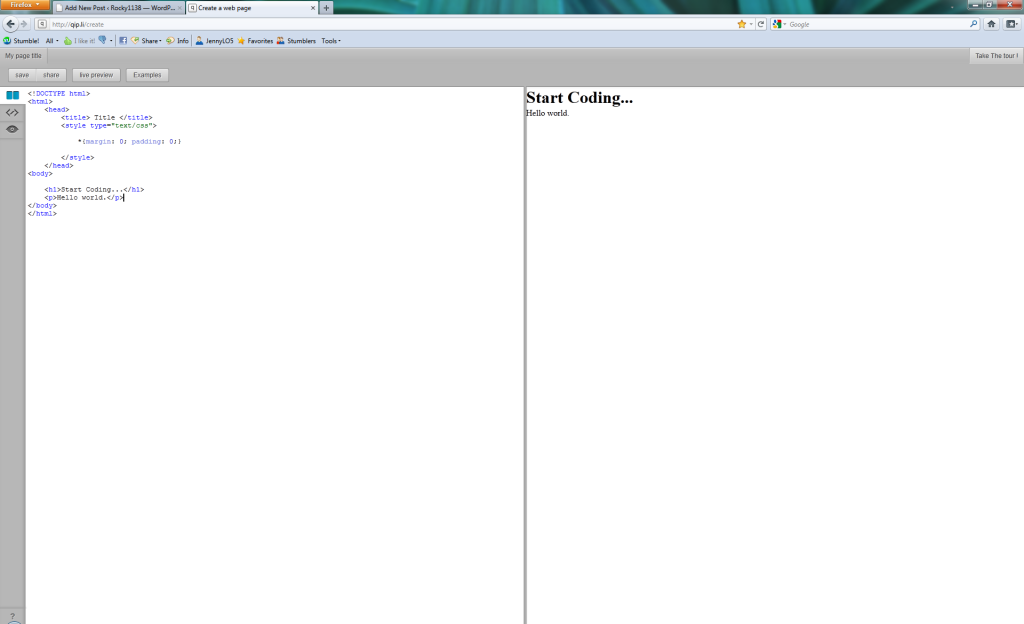
Today I stumbled upon this really nifty web app that lets you edit HTML and CSS as it shows a live version of what it looks like as you type. Check it.
Let me be straight with you: Every WordPress blog on the web should have this plugin installed.
And, no, I’m also not being paid to say that. :)
W3 Total Cache is exactly what its name suggests: A total caching solution for WordPress blogs. WordPress is a good publishing platform and content management system (CMS) but runs into problems quickly when more than a few visitors hit your site. Even moderately busy websites can buckle under the strain of the database connection pools, stylesheets, Javascript, and HTML that WordPress uses.
Some of the neat features that W3 Total Cache includes:
Before W3 Total Cache I was a fan of WP Super Cache. And before that, I used WP Cache. Neither of the latter two can hold a candle to the capabilities and caching power of W3 Total Cache.
For more information on how this plugin can increase your website’s performance, take a look at W3 Total Cache on the WordPress Extend website.
This post is a continuation of a previous article I wrote about sending in an array through HTML to your php script. This article deals with doing a similar thing except using ColdFusion. If you are new to the subject, it is highly recommended that you read the first article.
Though newer versions of ColdFusion offer support for arrays, earlier versions were centered instead around using lists. Because of this fact, this example will detail how to send a list into ColdFusion then loop over that list, allowing you you to perform whatever actions you need to do in your HTML form.
<form method="post" action="">
<p>Enter your friend's names (first, last):</p>
<input maxlength="30" name="friend" size="30" type="text" />
<input type="submit" value="Submit" /> </form>
<cfif isDefined("Form.friend")><cfloop index="ListElement" list=#Form.friend#>
<cfoutput>#ListElement#</cfoutput>
<!--- Do something with this value --->
</cfloop>
</cfif>
Because all of the <input> elements in the form have the same “name” value, your ColdFusion server will create a list variable called #Form.name# that you will be able to loop through and perform actions on each of the elements.
A handy feature of ColdFusion is that when it creates the list it doesn’t matter if your user enters data only in one of the boxes or only the last one. The list is put together for you of valid inputs from the user. Using this method, you don’t need to check to make sure the value isn’t blank!
Have fun!
If you’re into developing websites chances are there will be sometime during your life/career when you’ll need to have users enter data into a HTML form but you have no idea how many of a certain variable they’re going to be sending in or how much data they’re going to fill in of the same type.
An example would be a HTML form that has three input boxes, one for each of your friend’s names (first and last). You are able to enter between 1 and 3 friends into the boxes. For such an example your HTML form may look something like this:
<form method="post" action="">
<p>Enter your friend's names (first, last):</p>
<input maxlength="30" name="friend1" size="30" type="text" />
<input maxlength="30" name="friend2" size="30" type="text" />
<input maxlength="30" name="friend3" size="30" type="text" />
<input type="submit" value="Submit" />
</form>
That all looks fairly normal. Keep in mind this is a simple example. But, what about if you’ve got the option to enter 10 friends. What about 20? You might have to re-work your form if you want to enter 20 friends. Any more than 10 and you might want to look at alternatives like importing from XML or CSV.
Let’s say you’ve got the option to enter up to 10 names. Your increasingly ugly form would then look like this:
Example PHP code:
// Good God.. okay let's start this horrible task
if ($_POST['friend1']) {
doSomething($_POST['friend1']);
} else {
complain();
}
if ($_POST['friend2']) {
...
} else {
complain();
}
if ($_POST['friend3']) {
...
} else {
...
}
...
...
// There's got to be a better way!
Using PHP and HTML, the HTML form code can be re-written to have the server create a PHP array of your friends’ names, like this:
HTML Form:
<form method="post" action="">
<p>Enter your friend's names (first, last):</p>
<input maxlength="30" name="friend[]" size="30" type="text" />
<input type="submit" value="Submit" /> </form>
Server-Side PHP:
// Loop through the friend array
foreach ($_POST['friend'] as $value) { // Do something with each valid friend entry ...
if ($value) {
echo $value."<br />";
...} }
Let’s walk through that PHP code.
It’s fairly simple. We walk through the php $_POST['friend'] array that we retrieved from the HTML form using foreach and for all of the entries on the form that the user typed in we do something with (in this case we simply echo them to the screen).
This simple foreach loop will save you time and the good part is that you can have any number of friends on your form (I’m sure there’s a maximum somewhere though.. 256 maybe?) and this block of code will still work.
In the next article I’ll show you how to do the same thing with ColdFusion.

If you use the Smarty template engine for your site then you can take advantage of the included output filter Smarty plugin called trimwhitespace. Trimwhitespace is an output filter, which is basically a plugin that runs after your source code has been created but before it gets displayed or put into a cache file.
The premise for trimwhitespace is simple. Most HTML source code for most websites includes whitespace put there by the web developer for readability. Since this whitespace is not required for the website to display and takes up needed bandwidth, we can eliminate it. Enter trimwhitespace.
To enable trimwhitespace, place this command before your Smarty display() function:
$smarty->load_filter('output','trimwhitespace');An added benefit is that while the user recieves a trimmed copy of your HTML source code, you can still see your source in its fully tabbed and spaced glory by examining your template files. It’s a win-win situation!
HTML Code Before ‘trimwhitespace’:
<table>
<tr>
<td>
Content
</td>
</tr>
</table>
HTML Code After ‘trimwhitespace’:
<table>
<tr>
<td>
Content
</td>
</tr>
</table>
See the difference?