You might be a web developer. You might need to know what HTML element is under your cursor at any given time. You might need to know the hexadecimal value of a pixel is under your cursor at any time. You might have a mile-long CSS file inherited from multiple projects and wonder: “Which styles still apply and which are no longer used?”
Fear not my fellow web developers, web designers, programmers, whateverrers! These 5 Firefox Extensions will help you chop the time spent on any web development task so you can get back to reading blogs during the day. Or work. You choose.
Without further ado, here they are:
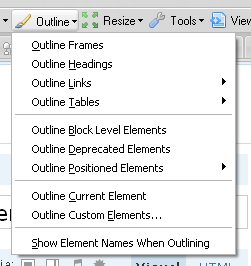
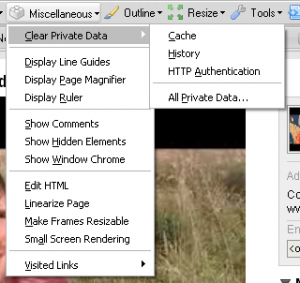
I don’t think I’ve ever used a web browser-based tool as much as I have this one. It’s saved me so much time and helped me solve so many problems over the past year. It does practically everything. With tools like “Resize Window” which lets you resize your window to a certain pixel width and height and “View Generated Source” which lets you see the source code used in the website AFTER Javascript runs — Instead of showing function(var 1, var 2) it will actually show the variables that went into that function e.g., function(“john”, “rockefeller”). Cool huh?
Cool features:
- A ruler you can use to measure the size of tables, divs, or anything else on your page.
- Disable stylesheets to see what your site looks like without any styles whatsoever.
- Display alt tags, image file sizes, image paths, and more.
- “Outline Block Elements” will automatically outline divs, paragraphs, spans, and other elements on your site. Very handy.
- “Outline Current Element” will display the element id and name for any element underneath your cursor. Unbelievably handy.
Sample Screenshots:
I’m sure we’ve all seen a cool color on a page, whether it’s an image or cell background, and said “Oh man I love that color. I could eat it. I wonder what the hex value is so I can use it on my site. Or in case I get hungry.” Well, you could always take a screenshot, load up The Gimp, use the Color Picker tool to determine the hex color value, but who needs to do that when you’ve got ColorZilla installed?
ColorZilla will display the hex color and RGB value of any color under your cursor. Very, very handy.

This handy little extension will show you the Google PageRank of whatever site you are on as well as the less-important-but-for-some-reason-still-used Alexa Ranking.
This handy little Firefox Extension will tell you which CSS styles are not found on your pages. It works per domain, so surf all of the pages of your site and a comprehensive collection of unused styles will be shown which you can then promptly delete from your stylesheet, thereby increasing the performance of your site.
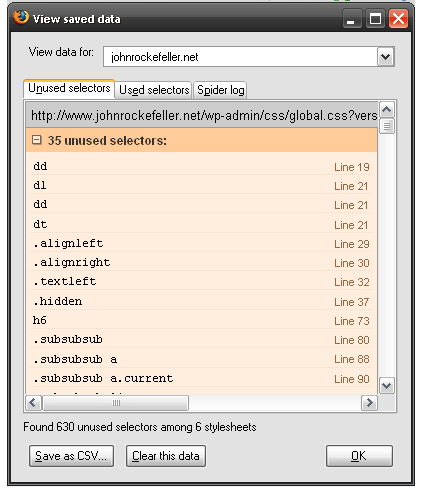
Very very, cool.
No Web Developer’s tool-belt would be complete without the illustrious Firebug. The list of features here is incredibly long, but so is the list of Web Developers who have saved hours of work using it. Their own website explains it better than I would but you’ve got to ask yourself one question: What kind of web developer are you if you aren’t already using this??
I hope you’ve enjoyed this list and found some of the links useful. If you’ve got something to say about these tools or even have a list of handy tools you use that might think others would find useful, please post a comment with a few links. Thanks!

