Cloud Folders Increase Productivity

Dropbox on Linux
Image by elecnix via Flickr

Being a web developer, I usually use several different computers on different operating systems across the lifetime of any project. Personally, I have 5 computers plus one server: Access to a Vista PC, a Windows 7 virtualized installation, my main Mandriva Linux desktop, a Eee 701 PC with Eeebuntu, a Mandriva Linux laptop, and a FreeBSD development server.

Moving files from one computer to the next used to be a time-consuming and ultimately prohibitive process. If I wanted to, say, take a break from working on my PC and work at the Red Brick Cafe for a few hours, I’d have to download my work files to a USB memory card then export the MySQL database and do the same transfer again to the USB memory card.

Or, I could burn a CD. Of course, how does one get the updated files back off the laptop and onto the PC when arriving back at home? This arduous process basically meant that freedom of choice in the work environment was severely hampered and was often more trouble than it was worth. But not any more.

Enter Dropbox.

Dropbox is a free service that is basically a shared folder in the cloud. It makes sharing files amongst any computer, whether it be Mac, Linux, or Windows, easy as drag and drop. And I really mean that. I love things that speed up my work processes because the less time I spend in administration mode the more time I can accomplish tasks in programming mode. Dropbox exemplifies this manifesto.

Any file you put in the Dropbox folder on a computer will instantly be available on any computer that install Dropbox on. Even better, revisions are kept so if you make a mistake with a file and don’t have backups, you can pull the file in question from the archives to restore it. What makes Dropbox different from any other revision or archiving setup is that this is all done without any administration by the user. Literally if you drag a file into the folder, all this stuff is done for you. No committing changes, no crazy hoops to jump through.

Oh, and the 2GB storage starter account is completely free. It’s the one I use daily. I don’t even think I’ve hit 25% capacity yet.

Take a look at Dropbox at http://www.dropbox.com/

Reblog this post [with Zemanta]

Nerd Overload: The Gecko Surfboard

There’s one thing I know for sure that I will be buying in 2010: The Gecko Surfboard.

It’s a $99 PC built inside a keyboard. How awesome is that?

It runs the Linux operating system and has beefy enough specifications to be able to run web and office apps with ease. I envision a great opportunity for these in the education sector. The devices are so inexpensive and capable, schools could literally hand them out each year to incoming students who would then take them home and bring them back and forth to classes. Data for their apps and school work could be saved in the cloud so teachers and assistants could mark work without ever printing a sheet of paper.

Seriously, it’s this sort of opportunity for a better world through technology that energizes me. It makes me happy to be a developer and happy to be a part of this awesome industry. I’d love to hear stories of cool instances of this hardware at work once it’s released. If you have something to share, please do.

For more information on the Gecko Surfboard keyboard PC, check out http://eeepc.net/the-gecko-surfboard.

Reblog this post [with Zemanta]

Make Music With Schism Tracker

There exists an obscure music format that an entire generation of kids grew up with, most without ever realizing the sub-culture and community that had grown up around them. The file format is called Music Modules, or Mods for short. There are many different kinds of Mod formats, each with their own unique set of features, but they all work using the same basic principles: The Mod file contains the “patterns” (digital sheet music) as well as the “samples” (instruments) that play according to the patterns. In this way it is somewhat of a cross between a MIDI and an MP3 file. Because each Mod includes the instruments with the file, each Mod can have a unique sound.

Mods were frequently used in videogames and PC games during the 1990s. If you had a Super Nintendo, Sega Genesis, or Atari Jaguar, chances are you have listened to Mod music and never even knew it.

The Mod community has been around for a long time and includes some of the best Demoscene musicians in the world. Making your own mods is free and easy and when you’re finished with your masterpiece you can unleash it on the world for comment and rating via websites like The Mod Archive.

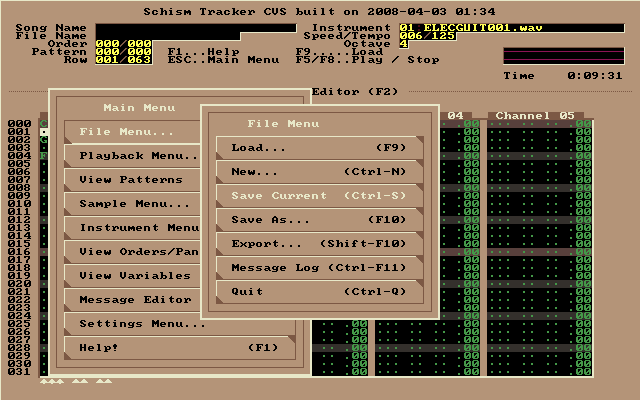
Schism Tracker Screenshot

Schism Tracker Screenshot

In order to make music modules you will need a computer with a sound card (if you bought a computer after about 1993 you should be okay :D) and a Tracker. The Tracker I use most frequently to make Mods is Schism Tracker. Schism Tracker is a remake of a classic DOS-based Mod Tracker known as Impulse Tracker. Schism Tracker will run on Windows, Linux, and Mac and is free to download.

If you’re interested in getting started with making music on your computer, check out this tutorial for Impulse / Schism Tracker and have fun!

Reblog this post [with Zemanta]

Breathe New Life Into An Old Computer

The IceWM Start Menu is supposed to resemble t...
Image via Wikipedia

My laptop is an Averatec 3260. 512MB of RAM, 80GB hard disk, and 1.6GHz processor. It’s had the front panel LCD and battery replaced, by me. It’s still missing the front bezel (I thought it looked cooler with it off.) Up until yesterday, the performance of the machine was just above what I’d consider to be “survivable” regardless of OS.

Then, everything changed.

While I was working with Cory Fowler at Red Brick Cafe and then later at my apartment, I was updating my copy of Mandriva Linux from 2009.1 to 2010.0. During installation something must have gone wrong because KDE4 no longer started properly. It kept bringing me back to the login screen. So, instead of using KDE4 I used IceWM.

I haven’t gone back to KDE4 since yesterday. And I’m the hugest KDE4 fan there is.

If you’ve got an old laptop or an old desktop that’s struggling under the weight of Windows XP or KDE4, grab a copy of Mandriva Linux for free and install the IceWM packages. Give it a go. I’m sure you’ll be impressed with the performance of your machine. I know I was! I remember running IceWM a few times when I first started using Linux quite a number of years ago but it has really come a long way since then.

IceWM runs all of the KDE4 programs I care about and even the Gnome programs, too. Watching a video on YouTube is made much easier with the lighter-weight desktop, as is just general browsing.

IceWM offers a lot of customization but some of it is complicated to configure. The easiest thing to do is to replace the God-awful default theme with something way cooler and easier on the eyes. The theme I’m using now is psicopoire.

The Box-Look.org website includes hundreds of awesome themes you can try out. And installing them is actually pretty simple. To install a new theme in IceWM, try this:

  1. Download the tarball
  2. Untar the tarball into the ~/.icewm/themes directory (if it does not exist, create it)
  3. Right-click on the desktop and go to Settings->Themes->Your New Theme’s Name

Does anyone else know any other neat, lightweight software to replace large-scale, heavy applications? I’d love to give them a try.

Reblog this post [with Zemanta]

Google Chrome for Linux Now Available

Google Chrome Icon
Image via Wikipedia

The world’s fastest web browser, Google Chrome, has recently been released on the Linux platform. This is big news since it will greatly improve the web browsing performance of many of the world’s netbooks.

I’ve been a huge fan of Google Chrome since it appeared in the summer of last year, but haven’t used it heavily simply because of the lack of Linux support. It is installed on my Windows 7 virtualization, however.

Word on the street is that Google Chrome is also available for Macs, so if that’s your platform, take a look!

One thing that I think is important to note that I haven’t seen anyone pick up on is this line on the Official Google Blog post about Chrome being available for Linux and Mac:

“At Google, most engineers use Linux machines …”

Hmm.. No wonder they’re winning! ;)

Go for it -> Download Google Chrome for Linux

Reblog this post [with Zemanta]