Placeholder Images For Your Site

Placeholder Kitten

Placeholder Kitten :}

Sean Yo from last night’s Guelph Web Maker Meetup shared a few awesome web tools I’d never heard of and I thought they were so neat I resolved to share them (and a few extras) today with everyone here.

Every web designer and developer under the sun has used (or at least heard of) the default ‘lorem ispum‘ text that is used as a filler for unfinished text copy on websites that are a work in progress. Well, now us web developers and designers have an option to use something similar for our images as well.

The image on the right should give you some sort of indication where is going… check it:


Movin’ On Up!

DZone MVB

Aw yeah, DZone MVB baby!

Great news! I just received the confirmation E-Mail letting me know I am now an official DZone MVB, or Most Valued Blogger. Blog posts from my Develop in the Google Cloud blog will be featured on the DZone site along with many of the other DZone articles from other MVBs. This will provide some extra exposure to yours truly and makes me really happy to boot!

I’ve been working on a Java/Google App Engine project called Quoats that displays a random quote from around the web. It’s a simple app that I thought would be a great way to get my feet wet with the platform and something I could share on my blog. So far, I am really enjoying a number of things about Google App Engine and Java including JDO and Google App Engine’s persistent storage mechanism. Tres cool.

If you’d like to learn more about Quoats, you can check out the project page (and the source code) on Assembla.

How To Setup A Local ColdFusion Development Environment in Windows

Interested in programming in the ColdFusion language?

Setting up a ColdFusion development environment on your local computer is easy! Just follow these simple steps. This small walkthrough will enable you to develop and execute ColdFusion web applications on your Windows PC. This software is not intended for commercial use — for that, you’ll need a licensed copy.

1. Download ColdFusion Developer Edition (for free!)

You may need to sign into your Adobe.com account (or create one if you haven’t got one yet) in order to download the Developer Edition of the ColdFusion server.

Download ColdFusion Developer Edition from Adobe.com.

2. Installation Options

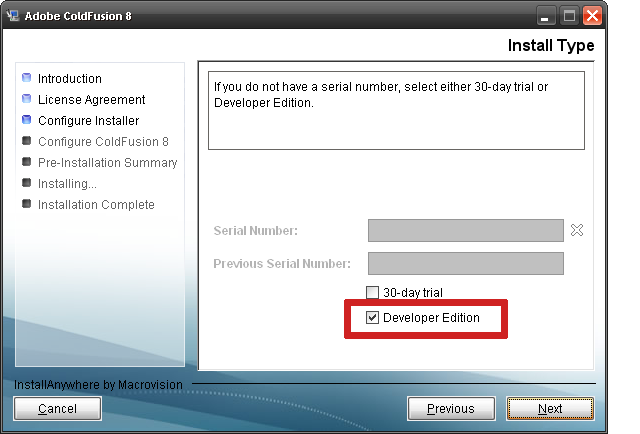
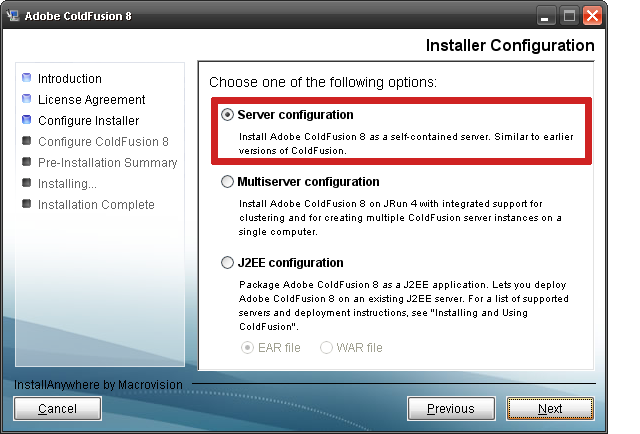
After downloading the software, begin installation. For all installation screens you should select all default options except in the screens shown in the images below. These settings will allow you to have the ColdFusion app server run on your computer locally.

Screen 1: Skip Product Key by selecting “Developer Edition”

Screen 2: Select “Server configuration”

Step 3:Select “Built-in web server” (This one is really important!)

3. Finish Installation

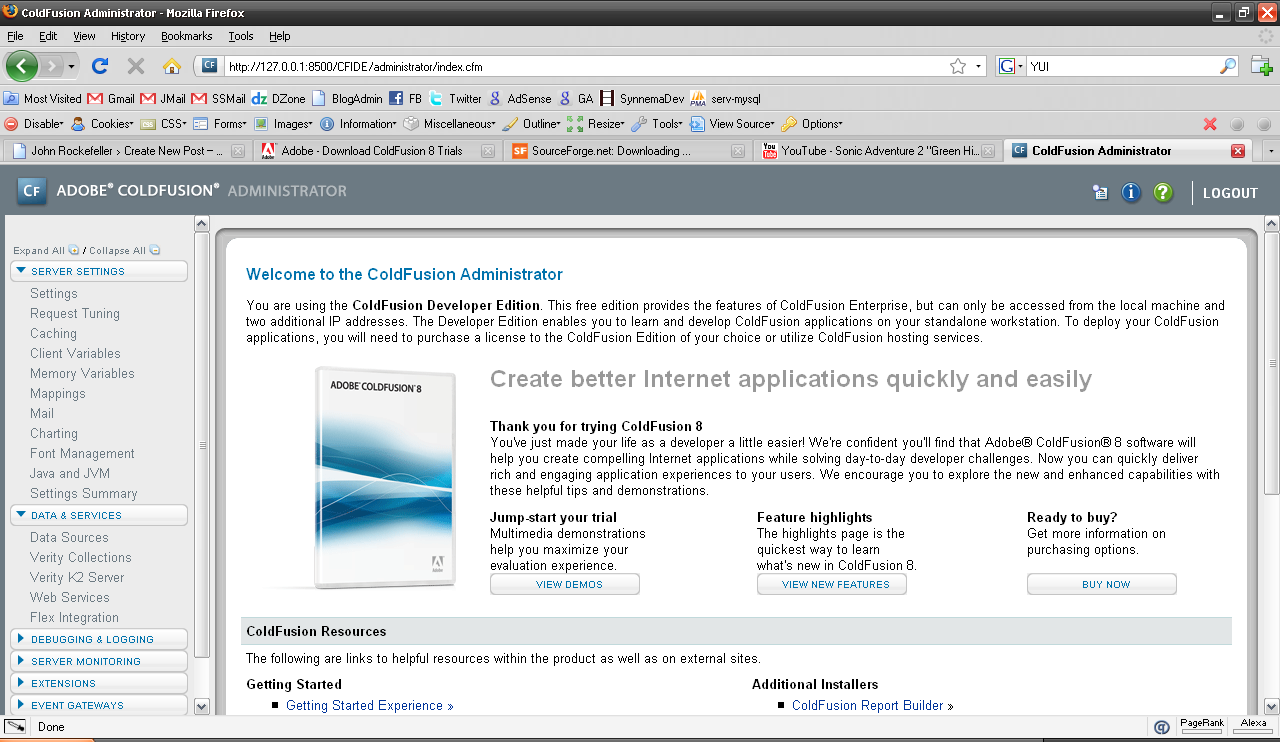
Once ColdFusion is finished, it will launch the completion script in your web browser and finish the installation. After that is complete, you will be taken to the ColdFusion Administrator screen, which will allow you to change all of your ColdFusion server settings and looks like this:

In the future you may need to change ColdFusion settings on your computer. This is the panel you will use to make those changes.

If you installed ColdFusion correctly, clicking here will take you to your ColdFusion Administrator.

Happy programming!

Leaving for Michigan… Excited about Yahoo! BOSS.

Every year during the second week of July our family has a reunion in Michigan, USA. I’ll be gone for three days but I’ll have the laptop and wireless. While it’s unlikely there will be a blog post during that time it’s possible! (who can stay away from blogging when it’s so addictive, huh? Didn’t think so!).

In the mean time I’ve been given (along with the rest of the programmers around the world) a new nugget to chew on and that is Yahoo! BOSS. In a nutshell, their new API will allow you to retrieve their search results and practically let you do anything you want with them. Re-order them, put ads next to them and generate revenue, mix them with your own results, you name it. It’s really intriguing and it’s definitely ballsy.

I’ve been thinking about Yahoo!’s potential return on this investment… Why would they give away the one thing that’s made them who they are? Well first, by taking the lead they are doing a few things such as increasing their standing with developers around the world as a partner to have and to stick with, they might also be looking for Google to follow suit or come up with a comparable system (gotta love competition), and finally they might also be looking for startups and unique talent to pluck from when all us developers start really using this thing in unique and interesting ways.

Just think: Yahoo! has basically said “Here’s our search results. Show us what you think you can do with them.”

Pretty cool!!

DemoCampGuelph6 was a lot of fun!

I got back from the 6th Guelph DemoCamp around 9:00pm last night. Free beer, free food, a group of 50 or more programmers, and one block away from my apartment. Guelph rules :)

If you live in the Guelph area and you’re interested in going to the next one, there will be another DemoCamp on the 17th of September 2008. You should be there. Presenting stuff is easy: You get 5 minutes to set up, 5 minutes to talk, and 5 minutes to answer questions from the crowd. If you just want to come listen and mingle that’s cool, too.

I presented Jack of All Links to the crowd and it went really well. There were a couple of guys from WeGoWeGo, which is a startup that’s gearing up in Toronto as well as a few other people presenting technology or software they wrote. I really enjoyed it.

I was really surprised at the size of the crowd! I figured there might be at maximum 10 people (I mean, how many programmers *are* there around here anyway) but there were over 50. Exciting!